
I play the piano almost every day, and I’ve been doing even more of it recently as circumstances have left me as the main piano player for our church services for a while. I built a nice cherry bookshelf for all my music about 9 years ago and I’m still enjoying that, but I’m not enjoying having to page through so many books to find the various pieces that I need to play. I do have an Excel spreadsheet with every song documented and what hymn it aligns with which helps, but I’ve always been interested in digitizing everything.
The main factor holding me back was finding a way to display the music that was not too hard on my eyes, portable, simple to use, good resolution, and had a screen size similar to a piano book. Most people who go this route choose a 13″ iPad Pro. That doesn’t interest me largely because it’s $1299 (before case and pen)… and because I don’t like the walled garden of Apple products. So I stuck with paper.
Then I found a video talking about the TCL NXTPaper 14. Some key stats:
- 14.3″ screen
- “E-paper” mode
- Included case
- Included pen
- 10,000 mAh battery
- Android
- 2400×1600 resolution
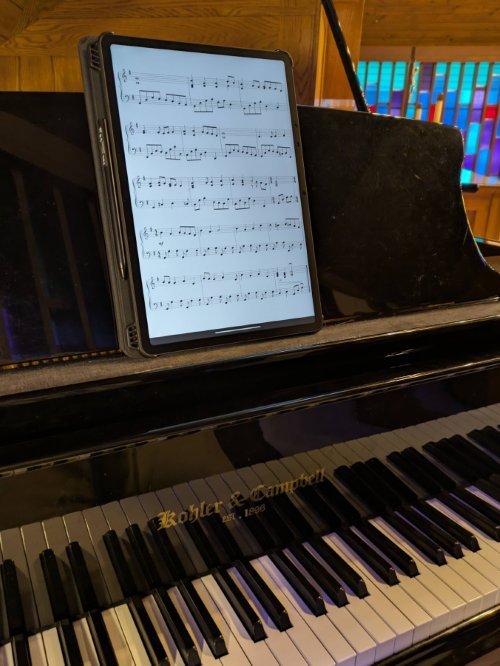
It checked all the boxes for me but what about price? $339! It’s bonkers! Surely it wouldn’t actually live up to the hype, but I ordered it to find out. I’m happy to say that this device is perfect for my use case. The only minor disappointment is that the e-paper mode is basically just a digital filter applied to the screen, but looking at a screen to play instead of paper has worked out fine for me. The battery life is incredible. I don’t worry about turning it on and off all the time (which is good because it doesn’t boot quickly) and I just charge it every couple weeks.
A big advantage of having a digital screen is that I don’t have to turn pages with my hands. I purchased the PageFlip Firefly pedal which connects easily to the pedal over Bluetooth. I got this one largely because it can be powered by a USB cable but after using it for weeks and only having the battery level go down about 10%, I’m thinking that really doesn’t matter. The hardest part is getting used to having my left foot in action. It’s pretty easy at home, but I’ve found it more difficult in live performances at church because of the way my legs fit under the piano and because I’m wearing shoes so it’s harder to be sure that I have my foot in the right spot before I press the pedal.
For software I’m using Mobile Sheets. There are a lot of different ones out there but this one seemed to fit me the best from the reviews I watched. While I would probably make some small tweaks to the UX, it’s great and I’m confidently spending time building up my database of music in that tool. (Also, I learned that it stores its data in sqllite and I could use GitHub Copilot to suck my data out into any other format if needed in the future.)
The final(?) piece of the puzzle is digitizing my music. A lot of the stuff I’ve bought lately has already been digital, but I still have tons of physical books that are used every day. I started using the flatbed scanner on top of my printer and that works fine, but for some sheet music, it barely fit onto that scanner bed so I spent way too much time rescanning the pages to make sure I got them all. So I bought a Plustek Optic Slim 1680 which can scan up to 11.69″ x 17″. That gives me plenty of wiggle room to just set the page on the scanner and be confident that it will all be captured.
Once I scan the pages in, there’s a lot of work to get the pages straightened, adjust the image to hide bleed through, crop out borders, split the files into songs, combine the files into PDFs, and name the PDFs. I did that once and then realized I could probably write software to do that. GitHub Copilot to the rescue! Writing an app that generates a visual output is an interesting challenge compared to my normal work so it took me a few rounds, but eventually, I got a perfectly customized app that sucks in all my raw image scans and spits out beautiful organized music that feeds right into Mobile Sheets. A day or two after I finished that, I realized that Mobile Sheets has a lot of this built in… but… I still like having a separate app so that all of this goodness isn’t locked inside of that app.
So this is quite a journey and I still have a lot of scanning left to do, but I’ve already been through two Sundays of playing at church and it’s really nice to not be constantly swapping books while I play and have less gap in the music while I turn pages. There’s still a learning curve but I’m very happy with the change.