This FoxTrot comic pretty accurately describes my website.
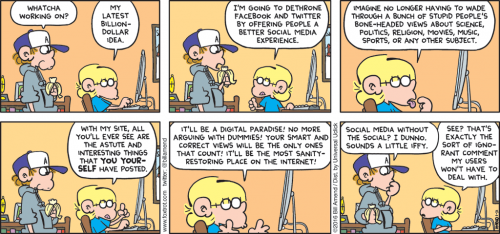

This FoxTrot comic pretty accurately describes my website.
 Pallets are everywhere, but did you ever think about where they come from or where they are going? They represent big money, big business and big lawsuits. Cabinet Magazine has a pretty good article about it.
Thanks to the “Timber” episode of the Stuff You Should Know Podcast for pointing me to that article.
 If you listen to podcasts, check out the Stuff You Should Know podcast. (If you don’t listen to podcasts, this is a great one to start with). The hosts, Chuck and Josh, take hour-long deep dives into literally hundreds of different topics. Here are some of their recent subjects: caffeine, Isaac Newton, Satanic Panic of the 1980s, the Great Wall of China and maggots. Each episode is full of great facts and plenty of comedic relief.
They have built up 500+ episodes of the podcast so you can listen for a LONG time before you run out of fresh content. Plus they are still publishing two podcasts per week.
 The rain in Seattle doesn’t bother me. I find what affects me the most is the lack of sunshine. Woodinville is 6 degrees further north than my hometown in Indiana and that correlates to about 30-40 minutes less sunshine in the winter than I grew up with.
We all know that you get less sunshine in the winter than in the summer and that the farther north you go, the less sunshine you get in the winter, but did you know that there are more minutes in a winter day than in a summer day? A day is defined by the time it takes the same point on earth to directly face the sun again. We aren’t just rotating around the axis of the planet, we are also orbiting the sun and we are not always the same distance from the sun. Right now the solar system is set up so that we are closest to the sun in the winter. That means we move more faster around our orbit than we do when we are farther from the sun. If we’re moving faster, that means that the earth has to rotate a little bit extra to point back at the sun again. Our winter days have 30 “extra” seconds in them!
If you want to see this all explained in a quick video, check out Minute Physics:
 Box joints (sometimes called finger joints) are a handy and strong way to join two pieces of wood at a 90 degree angle. I’ve tried a couple times in the past to build my own box joint jig. It’s supposed to be easy but I could never get it to come out right. Finally I decided that I have more fun building stuff than building stuff to make stuff so I shelled out the money for the Incra Box Joint Jig.
It’s not something that is required to do the job, but it helps me get the job done faster and with nearly perfect results every time. It’s hard to screw this thing up, but plan to spend 30-60 minutes with the DVD to set it up out of the box. Now that I’ve got it all calibrated, I can whip out box joints of any size in just a few minutes. The design of the jig is also a little safer than a normal crosscut sled would be.
The only gotcha that I didn’t think of ahead of time is the size of my dado stack. Since I have a somewhat wimpy table saw, I opted for the smaller 6″ dado stack. Why make the motor spin all that extra metal around? That choice combined with this jig means that I can’t cut box joints into wood that is more than 1/2″ thick because the blade doesn’t come high enough out of the table. The 8″ dado stack would solve this problem, but truthfully I doubt it will bother me very often.
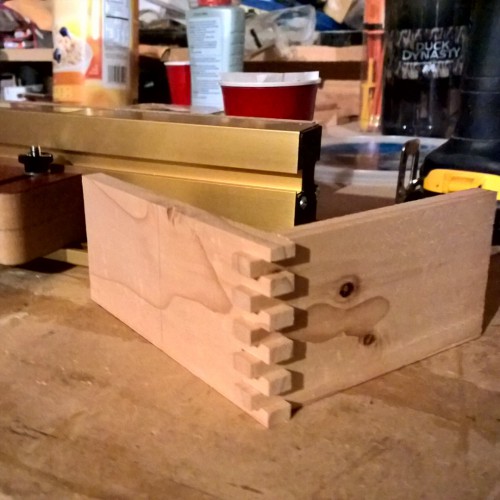
I’ll have some pictures of my first real box joint project in a post coming soon. For now, here’s a picture of my very first test. Obviously the fingers haven’t been trimmed down but you can see how nicely they fit together.
 Cribbage and euchre are two evening staples when I go back to the Midwest to visit family. At Christmas we generally had three people playing games so cribbage was the choice. We kept coming up with questions about the game that we looked up on our phones while we played. Here are some of the things we found…
Why is it called “nobs”?
If you hold the Jack of the suit that got turned up on the pile, you get 1 point for “nobs.” The short answer is that nobody really knows why it’s called that. Some ideas are that nob is British slang for an important person or for a person who thinks they are important. You can read more than you probably care to on this page.
What is the average pegging score for a round?
Most of the stats I found were for two player games. In those games, the dealer outpegs the other player on average. This is because they play second and because the dealer will always score at least one point. If the other player matches every card then the dealer gets one for the last card. Otherwise they’ll get one for a go. Back to the original question, on average, the dealer pegs 3.5 points while the other player pegs 2.1 points.
What is the average score in your hand?
Mathematically, it’s 4.55, but in reality, it’s higher because you strategically discard. The dealer generally scores a little less than the other player(s) because the dealer may defer some points ot the crib. For a 2 player game, mean for the non-dealer is 7.8580 (std dev 3.7996) and the mean for the dealer is 7.7981 (std dev 3.9082). For 5-card play the mean for both players is about 5.4.
How likely is it to get a 28 or 29?
The odds of getting a 28 hand in a two-player game are 1 in 15,028.
The odds of getting a perfect 29 hand in a two-player game are 1 in 216,580.
The odds of getting a perfect 29 hand in a three- or four-player game are 1 in 649,740.
 Marhsawn Lynch has been a staple of the Seahawks since arriving in 2010. I loved his style of running. He’d smash you in the mouth, plow you over, and leave you behind unless you brought two or three other buddies along with you. And sometimes even that didn’t stop him. His “Beast Quake” run is a great example of this: https://www.youtube.com/watch?v=ZPcfkxmhS_A
But now it looks like Lynch’s run (hardy har har) in Seattle might be coming to an end. He’s 30 years old and he already talked about retirement last year. I think that given his popularity, Seattle will happily give him the option to retire. Otherwise he’ll get traded away or just cut and the Sehawks will have about $6.5 million worth of extra room in their salary cap. That could go a long way toward beefing up the pourous offensive line. They could even ask for $5 million in signing bonus back from Lynch if he retires, but I bet they won’t.
Why the sudden change? When Lynch got hurt this year, Thomas Rawls came on board and stunned us. He looked like a younger, fresher Lynch. People went from worrying about Lynch being out for so many games to not caring if he came back.
And when Lynch finally was ready to come back, he didn’t win many friends with his apparent bad attitude. Everyone said he was ready to play. He had three full practices. Then on Friday afternoon he decided he ruled himself out and didn’t even travel with the team. Huh? Not only was it a late surprise, but because he practiced all week, the backups didn’t have as many reps with the offense. When Lynch returned in the game against the Panthers, he didn’t do much of anything and spent quite a bit of time on the sidelines.
It’s like he flipped a switch this season from “nothing can stop me” to a petulant child. And since he has this ridiculous thing where he doesn’t talk to the media, we’ll probably never know the truth.
Back channel rumors have it that he doesn’t have much respect for Carrol in practice and you know how much Pete puts up with stuff like that.
I’ll be shocked if Lynch is wearing a Seahawks jersey next year. And unless I actually hear his side of the story and it’s convincing, then I’m not sure I care. I appreciate all he did in Seattle, but his attitude seems pathetic.
 Steve from Woodworking For Mere Mortals, recently posted a project showing how to make a simple toy truck out of a 2×4. The end result is a truck that can have a pickup bed, camper, or trailer attached to it. Elijah has been asking to play with the semi truck that Grandpa Martens made me. That is special to me and I’d rather leave it on the shelf so I thought this project might be a quick way to get him his own truck.
I had Elijah come out in the garage a couple times to “help” me with the project so he could feel like it was partly his work too. We also made two sets of trucks so that we could give one to his friend Ike as a belated birthday present.
My DIY spray booth came in very handy for putting all this spray paint on in cold, rainy weather. The trucks came out ok. I used scrap 2x4s which was fine but some of them were pretty beaten up. These will be great trucks for the kids to bang on and smash. And if they break and we have to toss them? Well hey, it was only about $2 worth of wood!
 It’s really hard to put finishes on projects when it’s so cold and wet. If the fumes are flammable, I can’t let them dry in the garage because the pilot light from our furnace could ignite the fumes. I can’t get outside to spray things very often because of the rain. And whether I spray in the garage or outside, it’s usually well-below the recommended temperature for the finishes.
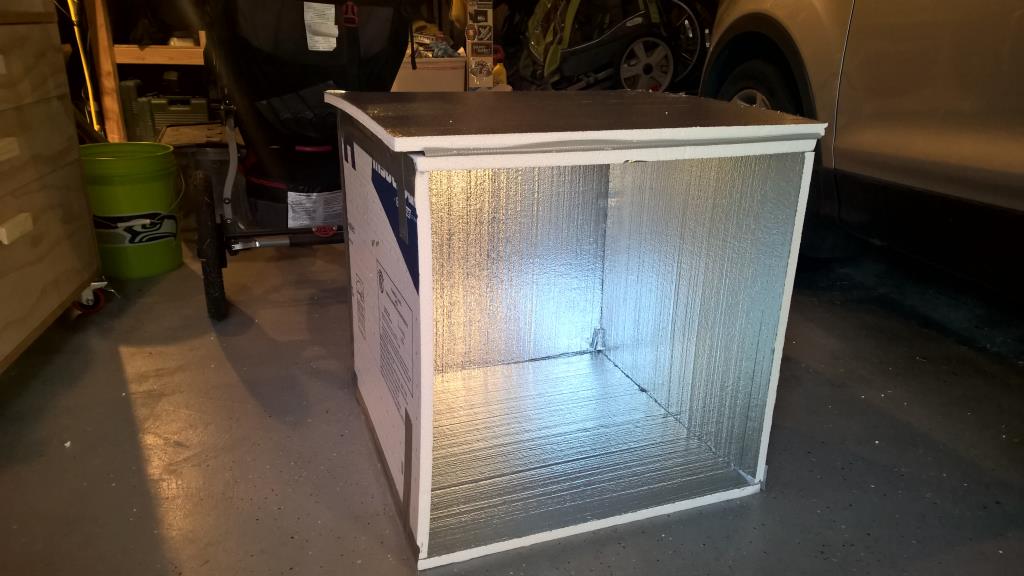
A couple weeks ago, I built a cheap and simple “spray booth” out of insulation foam. It’s a 2 foot square cube with one side that hinges open. I can set the pieces inside the box and spray them outside even if it’s raining. If I need a little heat, I can stick a space heater in there to warm everything up. I poked a couple holes in the top and ran a line between them inside the box so that I can hang parts and easily spray all the sides.
The only downside so far is that all the fumes exhaust out right in my face as I’m spraying. I have to wear a mask or I quickly get a headache. I bought some SonoTube and I think I might cut a hole in opposite sides so that I can have a fan blowing air through the box as I spray in from the open side. I could also blow warm air through the box that way too.
At well under $10 to make this, it has already more than paid for itself!
Election Season
Theoretically, any two people who disagree should be able to backtrack until they find common ground and then move forward step by step to see where they disagree. Unfortunately, this makes for bad TV ratings because it doesn’t have much shouting in it. But it would lead to some pretty interesting philosophical discussions. What is the responsibility of government? What is the role of morality in the government? What are our goals as a country? People disagree at these fundamental levels but we see it exposed way down the line when they’re arguing about health care or bombing another country. You’re unlikely to convince someone that their basic beliefs and logic patterns are wrong by pointing to the end of the chain and saying their result is dumb. I’m as good an example of this as anyone else. If you read this blog 12-13 years ago, you saw me screaming at the other side of the aisle. Dumb. I’m embarrassed by those posts but they are good reminders for me to not fall into that trap again.
Here’s a quick test when you’re reading about politics or having a discussion: if you think the other person is a moron, then you’re probably not having a logical discussion that’s going to result in anything good. For example what’s your gut reaction if I say, “I heard Obama (or Bush) talk for a while last night and he made some good points.” There’s a big chunk of the population that would have a visceral negative reaction and I didn’t even say what he was talking about. Fail. This isn’t healthy.
The example is true though. I watched the President on an episode of “Running Wild with Bear Grylls.” They headed out into the wild and had some very interesting conversations. I realized it was the first time that I’ve ever heard the President have a normal human conversation. In fact, it was one of the first times I’ve ever heard him talk at all since I actively avoid politics. But it was so refreshing to remember that he’s just a guy like all of us. One of the most memorable things he said was that he teaches his daughters to be two things: “useful and kind.” That’s terrific. But could most America agree that good advice came from someone they hate? It’s fine and healthy to disagree with the President, but hate him? No.
We only see that public figures defined by two or maybe three characteristics. The political media loves to exploit this by giving you sound bites that confirm just a few characteristics. This person opposes gun control, this person spends lots of tax money, this person is a warmonger, etc. It’s easy, but ridiculous, to extrapolate that tiny slice of an individual into an overall picture of whether that person is good or bad. Those tiny characatures of a person don’t let you decide that everything that they stand for is blatantly wrong. The truth is almost certainly that you agree on some things and disagree on the others, but the media only focuses on the disagreements because it’s beter for ratings and plays into the “us vs them” mentality that we love to succumb to.
Why are politics so divided? It turns out that liberals and conservatives are wired differently. It’s science. For a quick summary, watch Jonathan Haidt’s Ted talk called “The moral roots of liberals and conservatives“. He proposes that there are 5 moral values that make up politics and if you find out which of those five values people include in their definition of morality, you can predict who they voted for. If you’re intrigued by that talk, listen to his hour-long interview with Leo on the Triangulation podcast. Once you understand that people are fundamentally judging the same facts with different lenses, you can start to see how we continue to have such vehement disagreement.
So this election season, it’s important to be an educated voter and it’s good to have healthy conversations with people on both sides of the aisle, but watch out that you don’t get dragged into treating this like a 3rd grade screaming match. Two intelligent humans can completely disagree on an issue and both be right because most of the issues are completely subjective, and THAT’S OK.