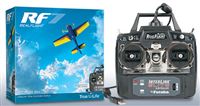
 I posted a while back about building an autonomous multicopter. As I read more about it, I realized that’s a bit of a big leap to take. First I should probably be able to fly it. And it turns out that multicopters aren’t the easiest thing in the world to fly. It’s probably easier to start with a plane. But if you’re going to start flying an RC plane, you probably want to either have a friend who can help you learn or get a simulator. I chose the simulator route, and boy, is it a good thing that I did!
There are a few to chose from, but I went with Real Flight 7 with an actual transmitter that you could use to fly an RC aircraft later. When it arrived, I wondered if I had blown my money on something I didn’t really need. I’ve played plenty of video games. I’m familiar with dual joysticks and I’m comfortable with controlling something whether it’s going away from me (easy) or coming straight at me (hard.) All those years of practice in video games probably helped somewhat, but I spent the first HOURS crashing my trainer plane repeatedly into the ground. The simulator paid for itself in the first 5 minutes.
After probably about 5 hours with the simulator, I was getting to the point where I could fly somewhat respectable figure 8’s and generally land the plane without destroying it. I was feeling pretty good about myself until I remembered that I had turned the physics all the way down to “beginner.” Bumping it up to intermediate put me almost back to square one. This is clearly a good use of money.
The simulator itself is fairly detailed. My system can easily handle the graphics cranked up to their max level so it looks very nice. It has a lot of planes and airfields. More are downloadable from the community online. In addition to normal solo flying, there are challenges like landing on a specific spot, breaking balloons, bomb drops and more. These are fun ways to increase your skillset. There’s also a multiplayer arena that I haven’t ventured into yet.
By the time the weather outside is nice enough to fly, I’m hoping to be confident enough to send a physical plane up into the air.

 In addition to the
  The top four teams faced off this week and only two survived. Logan put the smack down on me and Andy beat Dad. There were a lot of high scores around the league and consolation bracket was no exception. Tim put up the second most points in the league and beat Austin while Jim beat Luke. Next week is the championship! Logan and Andy will battle for supremacy.
 I dare say that I’ve gotten pretty good in the burger department over the years, but last week I tried a new recipe and it turned out really well. The secret was cooking bacon and then using some of the leftover fat to cook chopped onions which were then incorporated into the meat. YUM! As part of our semi-low carb diet, we ate these without buns.
 Tyla and I have been trying to mix in some low carb meals. I hate looking for low carb recipes because it seems like people think low carb equals vegetarian. Give me some meat! I ran across “
 It had been a while since I rebuilt my computer so I decided to do it over Thanksgiving break. I was amazed at how quickly it went! Windows 8.1 installed off a USB key in the blink of an eye. I probably could have used the reset functionality built into Windows 8 but I really wanted to do a bare bones completely clean install. Windows 8.1 remembers pretty much every customization I did to the machine and even all of the apps that I had downloaded from the Windows Store. Office and a few other desktop apps required manual install, but Office 2013 is takes literally a couple minutes to install.
 And there you have it, the final week of the regular season is in the books. As predicted last week, Logan secured the final spot in the playoffs. Here are the playoff seeds:
Christmas Card
In the past I’ve always hand-designed our Christmas cards. This year, free time is at a premium and Snapfish has so many great designs that we decided to use their service. I was very pleased with the end product.