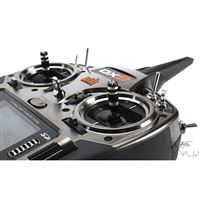
 One of the most confusing parts of getting started with RC airplanes was trying to figure out which radio to buy. First of all, you don’t even have to buy one. You can just buy planes that come with cheapo radios. I knew I didn’t want to go that route because it ends up costing more and you don’t get to use a quality radio along the way.
If you decide to buy one that can work with lots of planes then you have to figure out which brand you want: Futaba, Hitec, Tactic, Spektrum, etc. Not knowing much about the differences, I assumed they were all kind of the same. Wrong. In general, each brand only works with it’s own brand of receivers and if you want to hook two radios together for teaching purposes, they have to be the same brand.
The simulator I bought came with a Tactic radio (Tactic TTX600.) While there’s nothing inherently wrong with this radio, I later realized I want to invest in Spektrum. A huge number of Bind And Fly models come with Spektrum receivers in them. So if you have a Spektrum radio, you’re good to go. That meant that I ended up rebuying a similarly inexpensive Spektrum radio (DX5e) and then later on I’ll get a nicer computerized model (DX9?)
The detour through the Tactic radio only cost me about an extra $70 but it’s still something that you can avoid. Take some time to understand the differences between the brands, talk to friends who fly, look at planes you want to buy, and then make a brand choice. Simulators can work with a variety of brands.
It sounds like people sometimes end up with multiple brands of radios as they progress in the hobby, but to start with, you probably don’t want to keep spending money on radios.

 We make heavy use of OneNote which probably isn’t much of a surprise, but Tyla and I also use it a lot at home. We both have our own sections where we keep all kinds of notes and then we have a shared section where we keep the grocery list, ideas for gifts for friends and family, lists of doctors, and much more. It’s a great tool for getting rid of miscellaneous pieces of paper and for keeping in sync with other people.


 Tyla has a Christmas village from the Thomas Kinkade collection. She feels like she has enough big pieces but was interested in a couple accessories so back I decided to order her something for the Christmas of 2012. There’s only one website where you can get this stuff (other than used on eBay.) I placed my order and was told it would be 6-8 weeks. Oops. Well that’s ok, I’ll wait. After 3-4 months and a couple postcards with status updates, I was told that they would never ship my order. Ugh. For the Christmas of 2013, my mom decided to order Tyla some little accessories. The exact same thing happened to her!
 So now you’ve failed
Sidewalk Repairs
I’ve written many times about how I believe it’s a lot more useful to be involved in local politics than national politics. Here’s a good example about how much more responsive your local government can be.
Safeway is a little less than a mile down the road from our house so we frequently take walks down there. Tyla also runs along that sidewalk sometimes. There was one stretch that was getting destroyed by tree roots. It was so bad you almost couldn’t push a stroller over it anymore. It’s right on the boundary between cities so it took a while to figure out who owned the sidewalk, but after I found the right government, it was fixed in less than a month!
The end result looks a lot nicer and is much safer! You can see the before and after photos below. Thanks to the Woodinville maintenance crew for such a prompt response! I’ve had a similarly positive response with them for some traffic light maintenance. In that case they were out the SAME DAY to fix it.