This photo shows all of the cousins on the Martens side of the family at Labor Day in 1983. Does anybody know why we were wearing hats? Ryan and I have birthdays around that time so maybe we were celebrating?


This photo shows all of the cousins on the Martens side of the family at Labor Day in 1983. Does anybody know why we were wearing hats? Ryan and I have birthdays around that time so maybe we were celebrating?
A laptop recently landed on my desk full of some lovely viruses. I won’t say who it was, but really, you shouldn’t be too embarrassed. These virus writers are good at what they do and it’s easy to be tricked. As I fixed up the laptop, I thought about a short series of blog posts that might be of interest to many of you readers, not just the household that got hacked. I’ll cover how virus writers try to get you through your browser, how they attack via email, and then what to do after you suspect you’ve been hacked.
The most common viruses get onto your machine because you clicked something. It’s pretty difficult to have a computer sitting idle with no human in front of it and get a virus. We are the weakest link. So when hackers try to attack you via websites, they’re going to present you with something that is out of the ordinary, but just plausible enough that you’ll click on it. These popups might seem fairly legit. Here’s an example:
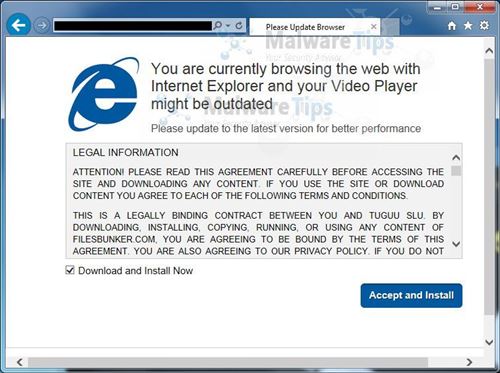
A geek will look at this and know it’s fake, but to the general populace, this seems like something serious that should be fixed by clicking Accept and Install. How can you tell it’s fake? That’s tricky but some basic ways are that this installation box is inside of a browser window. That’s your first red flag. What video player is it trying to update? If it’s going to install something, it should be pretty specific. If you have questions you could take that product name and search for it.
But really the best way to defend against this type of thing is to know the legitimate ways you’ll be warned about this type of thing and then be incredibly suspicious of anything that tells you to install something or “click here to fix your computer.” These days, nearly everything that is needed to fix your computer happens automatically in the background via Windows Update. You might see some notifications from Microsoft Security Essentials when you haven’t run a scan in a while but that’s about it.
You should also have Windows User Account Control enabled. Whenever a program tries to install on your machine or access protected areas of the operating system, it will pop up a warning dialog that asks if you’re sure you know what’s going on. Unfortunately if you believed something like the image above then this probably won’t stop you, but it’s a good backstop to really think about what you’re doing.
So if you get a popup that says you have a virus or that is asking you to install something unexpected, just stop. It’s probably a lie, but just in case it’s legitimate and Microsoft Security Essentials is trying to save you, snap a photo with your phone and email it to your favorite geek. Ask them if it’s legit and what you should click. You might save yourself a lot of trouble.
 Having a child has made me realize that I have way too many hobbies. Or rather, I have too many hobbies to sustain. When we transfer to new groups at work, the tradition is to send out mail introducing yourself and talking about your hobbies and interests. I included skiing, hiking, motorcycling, target shooting, phone and Win8 development, wood-working and RC airplanes. Even then I felt like I left some out! If there are 52 weekends in the year and a big chunk of them are taken up with family plans, there’s not nearly enough time left to devote to all of those.
I’ve been re-evaluating the time I spend with hobbies. Things like skiing or motorcycle riding are hard to justify because they pull me away from my family for a big chunk of the day. In addition to normal hobbies, my TV and movie watching has dropped to probably about 10-20% of what it used to be. I’ve barely touched video games since Elijah was born, but that had already started to taper off when I got married.
This is one reason that I decided to get into RC airplanes. In theory, we can all go to a park, spend time together, and I can fly a plane for a few minutes while we’re there. I’ve also heard that it’s an excellent parent-child hobby so if I’m still doing it when Elijah is old enough, it’s something he might really enjoy too. That would be a great launching point for learning about engineering, physics, technology etc.
It’s kind of a relief to admit that it’s ok if I don’t go skiing 10 times a year, go on a big multi-day motorcycle ride, or watch every episode of a TV show. And while I believe it’s still important to be involved in a hobby or two, I’m happy to have more time to spend with Tyla and Elijah!
 I heard about Peter F. Hamilton from enough distinct sources that I decided it was time to dive into his books. I started by reading Pandora’s Star and Judas Unchained. These two books go together and tell the story of our future as humans invent wormhole technology. I enjoyed the story but it was a bit too long in some places.
The Void trilogy (The Dreaming Void, The Temporal Void, and The Evolutionary Void) continues in the same universe, the Commonwealth, as the first two books. Some of the same characters appear too helping to tie the two stories together. This one too took a while to get going but finished strong with the third book. If I hadn’t had such strong recommendations for it, I don’t know that I would have stuck it out.
All five books land in the 3-4 star range for me. They’re good books, but they could be great with some pruning.
 We’ve gone through lots of books and Amazon reviews trying to find the right products for our home. Here are a few of our favorites:
We haven’t really regretted too many of our purchases. That’s good because there’s plenty of money to be spent on a new baby. Choosing incorrectly gets expensive!
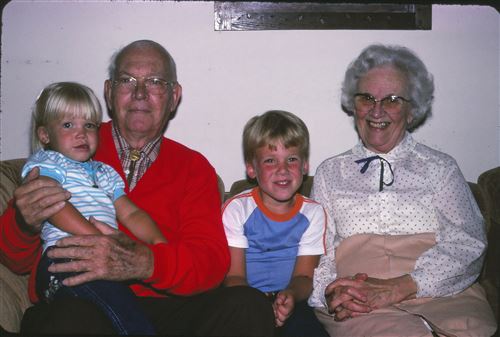
Earlier this week we ate brats. I told Tyla that every time I eat brats, I think about Great Grandma Hinkle eating brats. I don’t know why it sticks in my head. I just remember her being very proper and not being sure about the brats but carefully eating them with a fork and knife. I was also recently telling Tyla one of the few memories I have of Great Grandpa. He was helping me blow bubbles and somehow I sucked in instead of blowing out. Bubble juice does not taste good!
So when I was looking back through old photos for one to post today, this seemed like a good choice. Great Grandpa Hinkle died when I was pretty young, but Great Grandma lived until I was in college. They were wonderful people!
 Our little man turned eight months old a couple weeks ago. It’s fun to look back at the photos from just a couple months ago and see the tremendous amount of changes. He’s still a very happy kid with lots of smiles no matter what’s going on. When he’s happy he loves to talk and roar, and if he’s really excited he lets out an ear piercing squeal. He learned to crawl recently and then almost immediately started pulling himself up onto whatever he could find. He’ll grab onto your fingers and happily walk around the house. I wonder how long it will be before he’s doing that on his own?
Meal times are getting more interesting as he is beginning to eat lots of different solids like ham, chicken, avocado, carrots, and applesauce. Nights are still very long as he gets up pretty regularly every two hours all night long. We’ve received lots of advice about how to solve that, but we’re content with the situation as it is and we’re sticking to our plan. (We’re content… but we’d love to get 6 straight hours of sleep!)
It’s hard to imagine a happier baby. He’s got such a wonderful personality and I’m so proud to be his dad!
Tyla and I have been thinking about building a “baby jail” for Elijah. The idea is that it’s a blocked off area with toys in it where there isn’t anything terribly awful for him to hurt himself. He can play in there safely while we turn our backs for a couple minutes here and there. Since our dining room isn’t in use, we decided to block off the two entries there and just use the whole room.
The doorway to the kitchen is a normal size and there are plenty of gate options for that in the $50-60 range. The other entry to that room is 7 feet long and there isn’t much available to fit that well. I did find a couple options that were about $120-140, but I didn’t love them. So instead of spending close to $200 on baby gates, I decided to build them myself!
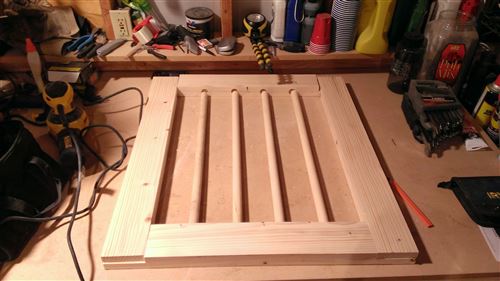
I built the smaller one first. It’s pictured below. I based it loosely on this plan from diynetwork. The frame is made up of 1×4 mixed whitewood (super cheap) boards glued together to make a 2×4. Dowel rods are spaced to create no more than 4” gaps. By choosing my measurements carefully, I was able to not have much waste wood and this whole gate only cost $32 including the hinges and latch. I sanded the whole gate quite thoroughly with the random orbital sander that I picked up for my last project, and then I covered it all with two coats of oil-based polyurethane. Yes, that’s safe for kids to suck on once it cures.
I think the longer gate will cost about $70 when I’m done. It’s not a huge savings but we end up with something that exactly fits our needs and looks pretty good.
So I’m saving money right? Well… sort of. I quickly realized that drilling ~60 perfectly perpendicular 1/2” deep 7/8” diameter holes for the dowel rods was going to be a tedious task with a normal drill. So I bought a brand new drill press to help. Ha! In fairness, I tried to buy a couple used ones on Craigslist and failed. The drill press worked wonderfully and will come in handy for lots of future projects.
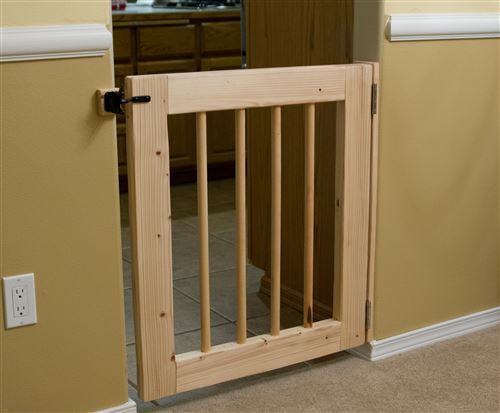
P.S. We did NOT choose the paint colors for that room! Once it’s done being a baby jail, it’s on my list of rooms to redo. I’m thinking that we’ll have wainscoting along the bottom and then choose a better color for the top. The previous owners had almost the whole house coated in a hundred shades of yellow.
 A newfound RC addiction in the middle of the rainy season in Seattle is a tough combo. Thankfully, indoor RC has been making tremendous progress in the last couple years. One of the products near the top of the list right now is the Blade Nano QX. It’s a tiny little quadcopter that flies extremely well. You don’t need much space to have a lot of fun. If you’ve been to our house, I regularly fly it in the man cave and downstairs in the living room/kitchen. I’ve even taken it outside a couple times when there is no wind.
The Nano QX comes in two packages. One is the RTF (Ready To Fly) and it includes a transmitter. The other option is BNF (Bind aNd Fly) which requires you to have your own Spektrum transmitter. If you’re just getting this as a one-off toy, then the RTF is probably the model for you. But if you’re buying other planes and helis that use Spektrum receivers then BNF can save you money since you don’t need to keep paying for new transmitters.
My previous favorite in this area was the Syma 107 helicopter. That is a lot of fun for a very low price, but it doesn’t take too long to master it and then you’re a bit bored. Plus, I flew mine so much that I wore out the motor. The Syma has throttle, rudder and pitch. The Nano QX adds aileron so you can move side to side as well. It gives you a lot more control but it also is more of a challenge. Don’t worry about the learning curve though. The Nano can stand up to a beating, but if you do have some trouble, a second set of blades is included in the box. You can also replace everything else piece by piece if needed.
The awesome guys over at FliteTest.com have a video about the Nano QX as well. Give it a look and I bet you’ll want to buy one!
 This has been a very bad year for skiing in the Pacific Northwest. The bad weather, combined with my lack of free time, means that I haven’t had any days on the slopes yet. That all changed about a week and a half ago when a series for storms started hammering the mountains. They were receiving about a foot a day every day.
On Sunday night, Crystal received two feet. Then on Monday they had to stay closed all day because of a power outage. On Monday they got another foot and a half leaving 3.5 feet of untouched snow and 66” in four days. I took Tuesday off and headed for Crystal.
This ski trip was a lot different than last year given that we have a baby at home now. Also, Tyla wasn’t feeling well so I wasn’t sure I could even go. The night before, I decided to relax and just take it as it comes. I wouldn’t worry about getting first chair, planning an attack on the mountain or anything like that. It’s a good thing I took that approach.
First I left the house about 20 minutes late as I took some extra time to make sure Tyla and Elijah were off to a good start with their day. Traffic and slow drivers in the snow added another 40 minutes to the normal trip time. That meant I hit the Crystal parking lot at 9am (when the lifts open) instead of the 8am I had planned. Once I got up to the ticket counter, I discovered that their online system for buying tickets had been offline so the normally short lines were HUGE. It took 30 minutes to get a lift ticket. Oh how I missed my season pass from last year!
Only Chinook Express and Forrest Queen were running while ski patrol detonated lots of avalanche bombs to make the shaky snow pack safer. I took some easy runs while I waited for more interesting lifts to open. The lines were enormous as all of the powder hungry skiers and kids on mid-winter break crammed on to the two lifts. Rainier Express finally opened and, after a 30 minute wait in line, I made it to the top. Down below, the snow was falling very fast (1-2” per hour according to the telemetry), and up top it was WINDY. The sensors were showing 30 mile an hour average winds with gusts well over 50mph. Throw in the very thick cloud layer and it was almost impossible to see up there. Now add in that 3-5 feet of fresh snow and wow, it was a crazy situation. These are the types of days where you really do need a partner to stay safe up there. It’s so easy to fall into a tree well or get stuck somewhere. It was so bad that I actually called it quits for the day. Even though I had only been there a few hours, I got stuck in the parking lot trying to leave. Thankfully I had remembered my shovel and was able to dig myself out and get traction with some old t-shirts in front of the tires.
It sounds crazy, but apparently you can have too much snow… or maybe I’m just getting soft in my old age.
UPDATE: I wrote this on Tuesday after I got home. Later, I learned that a skier died on Monday at Stevens Pass (hit his head on a rock) and a skier died at Crystal on Wednesday (stuck in a treewell and his buddy couldn’t reach him in time.) Couple that with numerous in-bounds avalanches triggered by ski patrol with explosives and I think it validates my decision to come home early. The mountains are no joke.